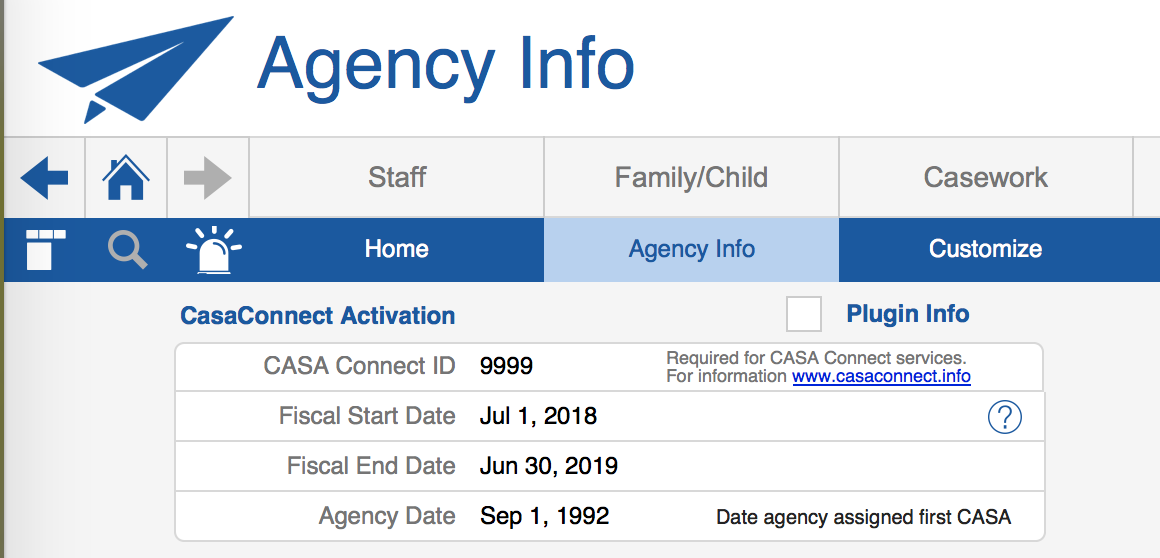
Fiscal year July 1, 2017 – June 30, 2018 has come to a close. This is a friendly reminder to make sure you update your fiscal dates in CasaManager > Home > Agency Info screen.
Why do this? There are several places in CasaManager where the fiscal dates entered impact what you see in CasaManager.
1. The Quick Date picker in the Reports menu is based on the Fiscal Year. If you select “Last Fiscal Year” but you haven’t updated your current fiscal year you will not be getting the dates you expect!
2. The Case Hours and Non-Case Hours screens are designed to show only those hours that fall between the fiscal start and end dates. That means if you haven’t changed your FY dates from 7/1/17 – 6/30/18 and you enter hours for 7/1/18 those hours will entered will seem to “disappear”. Don’t worry, your work is not lost but it is also not going to be viewable unless and until you update your FY dates to 7/1/18 – 6/30/19.
3. On the Inservice Workshop screen the pop-down list of Inservices your agency has offered is also controlled by the FY dates. It will only list workshops that have a date that falls between the start and end dates of your FY as entered in the Agency Info screen.
4. On the Inservice screens the workshops, videos, tapes and independent study that your volunteers have taken will also be filtered by the FY dates you have entered. That means anyone who attended a workshop with a date that does not fall within the dates on the screen will not be visible.
So, do yourself and your staff members a favor, after you have run your reports for FY 7/1/17-6/30/18 remember to update those dates in the Home > Agency info screen.