

If you are attending the NCASA Conference in Boston this week, come by the booth and say “hi” to Gina, Matt and Jeff.
The feedback on CasaManager 16 has been tremendous! It has been a lot of work to get here, so the positive feedback has been greatly appreciated.
One of the many benefits of web-based CasaManager 16 is the ease with which we can push out updates. Last night we released v16.1.2. This update includes last minute changes NCASA made to the Annual Survey and several feature enhancements. For example, when customers asked that the Notes and Hours on the CasaConnect overview screen stay visible longer, we added the ability for staff to adjust the number of days. When our customers have great ideas for new enhancements they don’t have to wait in line for months to see whether or not they get done. Now that CM16 is web-based we can implement those great ideas immediately!
Did you know in CasaManager 16 that you have the ability to change the field label? Previously, you could change a field label by going into layout mode and over-write the default label to a word that was more meaningful to your agency. You may also have used Miscellaneous fields to capture information specific to your agency.
There were two downsides to doing this in layout mode:
- The field may appear on more than one screen and therefore have to be changed many places – some staff may not have even realized!
- These changes had to be re-done whenever you upgraded to a newer version of CasaManager.
To address these issues we added the ability for you to change a wide array of field labels in the Agency Preferences. When you change the label from “Misc1” to “Favorite Color” CasaManager 16 stores the change in your data. Not only does this preserve the change when we update, but it also updates all labels associated with the field anywhere they appear in the database! The v16.1.2 release extended the number of field labels that may be customized, to more than 90.
If you haven’t migrated to CasaManager 16 yet or would like to have an overview of its new features, here are a couple of resources to help you see what you’re missing!
Video: Who moved my cheese? a side-by-side comparison of CM15 to CM16
Online Help: What’s new in CasaManager 16!
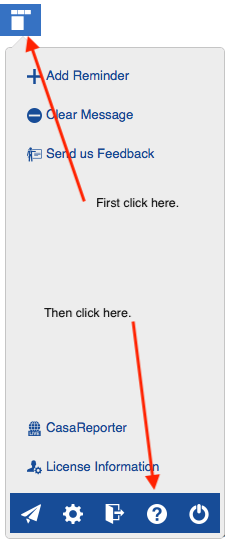
The online help module is integrated within CasaManager 16. To access the help module, simply click on “?” icon in the new Button Panel. This icon is located at the top of every data entry screen. We have added context to the help module. That means when you click help, CasaManager opens the help page associated with the specific screen you are on. The help module is online and constantly updated when necessary.
Let us know if you have any questions.
We hope to see you in Boston.